Showing posts with label windows os. Show all posts

Monday, 24 December 2012

Download Apk Files Directly To Your PC From Play Store


For Original Post Visit Here

First of all Merry Christmas to all of you.
As a Christmas Gift i would Like to tell you my secret of getting Apk files for you>>
Today on the day of Christmas i am sharing a trick on how to download android Apk files from android market for those who don't have Bar code Reader or don't like to recharge their phone with net cards.

Note: This Software Does not Download Paid Applications It can be Used to Download only Free Applications & if you want to download Paid Application Then Download Application From Here


So here Is the Step by step Tutorial:
  • First of all download the .zip file from Here.


  • Unzip the .zip file & Double Click on "Real APK Leecher(allapkapps.blogspot.com).exe" [You don't have to install it as it is only a application file not a installer]
  • Click on the "Run" on the opened Dialog Box.
  • Now click on "Edit" & then Choose "Option". Anew Dialog Box Will Appear Write Email and Password that have been used as a main account in your Android phone {To Open Play Store}.
  • Now you have to type your device id and to obtain a device ID, type *#*#8255#*#* on your phone and seek for device id [It is your model no id which is provided to each phone model, it defines whether tha app will work or not on your phone.]
  • Type the default folder where you want to save the file.
  • Save It and you are Done.
  • Now just type the app name you want to Download and hit search icon [Top Right Corner]
  • Click on the app and when it is highlighted Right Click and choose "Download The Apk"
  • Wait Till it gets 100% and then click hide. 
  • Go back to the default folder and copy the apk file To your Phone
  • You are Done.

Don't blame us if anything happened to your google account. Use this software at your own risk!!     


Sunday, 23 December 2012

Stellar Phoenix Windows Data Recovery Software


Have you accidentally deleted your files from the Hard disk? Do you desperately want to recover them back? Well you need not panic! It is possible to recover the deleted files back from the hard disk (even after you have Shift+Deleted) provided you act as soon as you realize that the files are deleted and use the best deleted files recovery software. In this post you will find a detailed information on how to recover the deleted files from your Windows PC or Mac.

Today there exists hundreds of data recovery tools and softwares on the market which boast to recover 100% of all the deleted files back in the original condition. But in reality most of these softwares are neither effective nor capable of recovering your files back. So it is very much necessary to make the right choice of the file recovery software in order to recover deleted files back in the original condition. 

Stellar Phoenix is one of the best company specializing in deleted files recovery services and solutions since 1993. Stellar’s Data Recovery Solutions encompasses a wide range of software for almost any data loss situation ranging from accidental formats to virus attacks to software malfunctions. Hence Stellar provides the best tools to recover deleted files with over 1,000,000 satisfied customers across 137 countries.


How the File Deletion Process Works?

When you delete a file from your computer (or even from the recycle bin) the file is not actually deleted. Unlike what most people think, the file is not permanently deleted or dropped from your hard disk. when you delete a file from your hard disk, only the pointer which points to this file is removed and not actually the file itself. This file still exists intact and is 100% possible to recover it back in the original condition. In this condition the file becomes invisible and hence appears to have deleted. 

What are the Chances of Recovering my Files Back?

Since the operating system doesn’t immediately re-use the space from the deleted files, it is most certainly possible to recover the deleted files back in 100% original condition. It may take up a very long time for those files to be completely deleted since the modern hard disks have ample capacity. Hence the chances are too less that the space from the deleted files are re-used immediately.Some files are reported to have recovered even after years of it’s deletion. However for the best results, it is recommended that you use the file recovery software as immediately as possible to recover your files.
Stellar Phoenix Windows Data Recovery

 With this you can >>


  • Recover FAT16, FAT32, VFAT, NTFS, and NTFS5 file system partitions
  • Recover deleted emails
  • Recover deleted documents
  • Recover deleted photos
  • Recover deleted music
  • Formatted Hard-Drive recovery
  • Recover files from USB Drives, CDs, DVDs and memory cards
  • Recover almost all the camera format files

     Visit the following links for more information on Stellar Data Recovery  

    1. Stellar Phoenix Data Recovery (for Windows) 

    2. Stellar Phoenix Mac Data Recovery (for Mac) 

     Download Stellar Phoenix Data Recovery For Windows (WITH PATCH Working From Here) 
    {Password-friendstechworld.blogspot.com}


    Wednesday, 19 December 2012

    How To Speed Up Internet Connection??


    Today I am sharing another interesting article describes how to speed up your Internet connection without use of web accelerators, The speed of your internet connection doesn't just depend on the speed of your network, By default, most system have some bandwidth reserved for nothing, You can change this the following way, In order to do this you will have to hack the system registry.


    Step 1- Click run in your start menu, Type gpedit.msc into the box and press OK


    Step 2- Navigate Local computer policy > Computer configuration > Administrative template > Network > QoS pocket scheduler then open Limit reservable bandwwidth


    Step 3- Click enable and change the bandwidth limit to 0% instead of 20%, Image refer below


    Wednesday, 5 December 2012

    Nokia Partners with China Mobile to Launch the Lumia 920T, the First TD-SCDMA Windows Phone


    GUANGZHOU - Nokia and China Mobile today announced the Lumia 920T, the first TD-SCDMA Windows Phone in China. With advanced location services, photography innovation, and fast mobile browsing on China Mobile's 3G network, the Lumia 920T offers Chinese consumers the most innovative smartphone experience.

    "We are delighted to partner with China Mobile, the world's largest operator, to introduce China's first Lumia based on Windows Phone 8.  People around the world are responding positively to the new Lumia devices, and we're confident that the enthusiasm will extend to China with the Lumia 920T," said Stephen Elop, President and CEO of Nokia.

    "Our close cooperation with Nokia is a key contributor to the success of China's TD industry, and will further enhance the rapidly growing TD ecosystem. We are excited about this important next step in our partnership, and we look forward to creating an even more vibrant TD industry together," said Li Yue, President of China Mobile Communications Corporation.

    The Lumia 920T uses Pureview's advanced floating lens technology, and takes in five times more light than competing smartphones without using a flash. This makes it possible for people to capture clear, bright pictures and video indoors and at night.

    The Lumia 920T also has the world's most sensitive touchscreen, and thanks to Nokia's ClearBlack display technology offers better visibility in the brightest sunlight. The Lumia 920T also comes with the full suite of Nokia navigation applications, including Nokia City Lens.

    As the largest operator in China, China Mobile will play a significant role in bringing the Lumia experience to more Chinese consumers with its expansive TD network coverage. Lumia 920T's powerful dual-core Snapdragon S4 processor, partnered with China Mobile's high-speed 3G network, is set to deliver fast data connectivity. In addition to the rich applications available in Nokia's Marketplace, Lumia 920T users will enjoy the additional benefit of access to Mobile Market, China Mobile's application store, offering a large range of applications and services tailored for Chinese people, and an easy shopping experience

    Strong, Growing Ecosystem

    To further drive momentum of China's Windows Phone ecosystem, Nokia and Air China today announced a strategic partnership which lets consumers enjoy wireless chargers in Beijing Airport VIP lounges. Furthermore, Jiepang announced a service that lets consumers enjoy great deals by simply tapping their Lumia 920T using NFC in some outlets in Beijing, Shanghai, and Guangzhou.

    Nokia demonstrated its commitment to local developers and entrepreneurs by launching the Nokia Experience & Innovation Center (NEIC), the Academy Program and most recently the Booster Program in partnership with the government and other companies. These initiatives provide fledgling innovative Internet developers and entrepreneurs with business advice, technical support and a low-cost operating environment in which to grow, helping them turn their ideas into applications. These programs will also continue to drive and support the increasing amount of grassroot innovation, further boosting the Windows Phone ecosystem in China.

    Price and Availability

    The Lumia 920T will be available for order by the end of the year. It will retail at RMB 4599 without contract and come in four colours; black, white, yellow and red.


    Source

    Nokia
    Communications
    Tel. +358 7180 34900


    Monday, 1 October 2012

    How To Change Your Start Button Of Window


                             This Is Just Simple Tricks But Just Do It Carefully Don't do any Mistake..

    First you need a tool called "Resource Hacker". This free service program allows you to change resources in any .exe file such as "Explorer.exe", which includes the [Start] button's Label. You can visit Download.com and search there for "Resource Hacker".

    After you download it, follow these Steps here:

    Step 1

    • Run "Resource Hacker" and open the file  %windir%\Explorer.exe
    • You see a Tree of all Resources in this file, expand the "String Table"
    • Find the "start" and replace it with your own text. then press the [Compile Script] button.
    • Save "Explorer.exe" as "MyStart.exe" DONT save it as Explorer.exe, do "save as.." and give it a new name.
    • Quit "Resource Hacker".


     After Following These Steps Then Follow

    Step 2

    • Click on the [Start] button and choose the "Run." item from the start menu.
    • Type "RegEdit" in the Run "Dialog Box". And then press the Ok buton to run the "Registry Editor" program.
    • Go to: " HKEY_LOCAL_MACHINE\SOFTWARE\Microsoft\WindowsNT\CurrentVersion\Winlogon " and find the "Shell" property.
    • Replace value of the "Shell" property to "MyStart.exe".
    • Quit "Registry Editor".


    Restart your system and You have done this trick.

    Lets See here i change Start button into my name...


    Changing The USB Icon


    Today i am going to  provide you the Simplest Way to Change the ICON Of your USB Pen Drive. so let's start the process.


    1. First of  All you will Need  some Icons  to change your USB Icon. Please note that  the  icon files  are those files which has   .ico  extension. (If you don't  have any Icon Files then  you can Download some  by  Click here)

    2. Now  after downloading  Icon file  Place  your desired Icon  to your  Pen Drive.

    3. Now Open Notepad and write the following line of code

    [Autorun]

    icon=youricon.ico


    4. Change your icon  with  the name of your  downloaded Icon.

    5. Now save This file  in Your  USB Pen drive  with   name   autorun.inf

    6. Don't  forget to  change  "All Files "  in  save as .. shown in given below


    You are done now . So hide both  autorun.inf and  icon file to protect it from deleting .

    Remove your USB Pen drive and then  Insert Again to see the changed icon of your USB .

    If it still fails then please Restart your computer to see the effect.


    Change the administrator Password WithoutKnoing older password


    If you forget your old password or any other reason and want to tease any person by changing his / her administrator password then follow these steps


    1. Go to Control Panel  >>  Administrative tools  >>  Computer management  >>  Then System Tools

    2. After That Go to Local user and Groups  >>  User

    3. Then  on Administrator Do Right Click and then Set Password  >>  Then Click Proceed

    4. Now enter your new password and press ok button. (See Images for Reference)


    Product Key that works on Windows XP all Service packs


    Sometimes we Lost or are unable to find Product Key to install window xp but when you try to use another product key like we use Windows XP Service pack 2 Serial key in  Windows XP Service pack 3 but It can't accepted by Service pack 3.


    Now Here Is a Solution OF your Problem you Can Use One of the product key from these given three Serials
    • XP8BF - F8HPF - PY6BX - K24PJ - TWT6X
      • RHKG3 - 8YW4W - 4RHJG - 83M4Y - 7X9GW
      • YVGKQ - B7QYX - WWPBR - M7T2R - PB8BM


      Choose One of them of your own choice. If there any problem of any other suggestion about this feel free to post comment.


      Friday, 21 September 2012

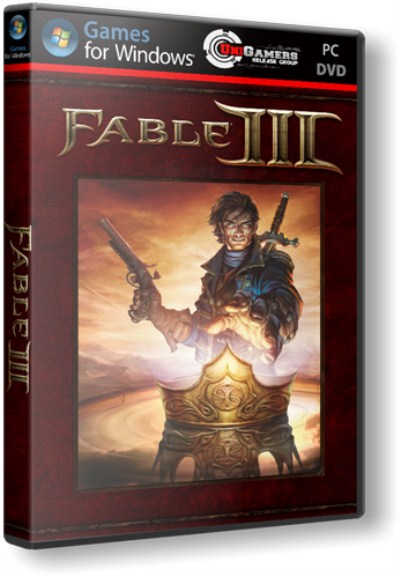
      Download Fable 3 game for PC [Free]


      Fable 3

      PC
      MULTI8
      Developer: Lionhead Studios

      Publisher: Microsoft
      2011
      7.55 GB


      Genre: Action (RPG / Adventure) / 3D / 3rd Person


      Fable III - continued bright and vibrant games, which received the highest marks from critics and the approval of the users themselves - selling Fable II exceeded 6 million copies. Events in Fable III unfolds 50 years after the adventures described in Fable II. Albion ready for the industrial revolution, but the kingdom is in danger.

      In Fable III, before the throne, you have to go through a lot - to participate in bloody battles side by side with his subjects, find love and grief. All the decisions that you will take, first fanning the flames of revolution, and then - Voss to the throne of Albion, will have a tremendous impact on the fate of the entire country and all residents.


      after downloading use daemon tools or any other software to mount the image


      Thursday, 20 September 2012

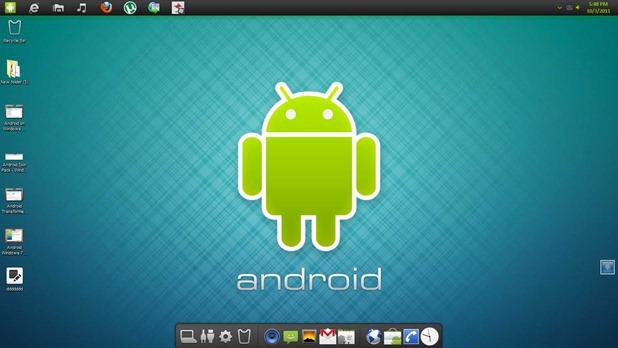
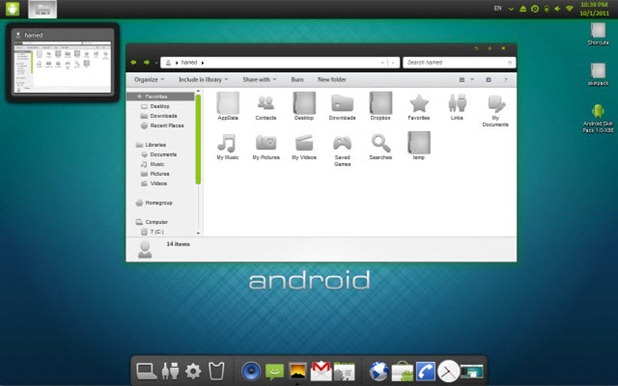
      Android Transformation Pack For Windows 7


      Requirements 
      1. Must have Windows 7 Installed.
      2. Minimum of 1 GB Ram Installed.


      Steps to install the transformation pack


      1. Download the transformation package according to system from below.
      2. After Downloading Run the installer and than accept the terms and than follow the steps to install.
      3. Package will automatically apply any patching needed so you don’t have to worry about anything.


      Friday, 7 September 2012

      New Nokia Lumia Range Delivers Latest PureView Camera Innovation, New Navigation Experiences and Wireless Charging on Windows Phone 8


      Nokia Lumia 920 Captures Best Pictures and Video Ever Seen on a Smartphone
      Espoo, Finland and New York, NY - Nokia today announced the Nokia Lumia 920 and the Nokia Lumia 820, the first devices in Nokia's Windows Phone 8 range.
      The Nokia Lumia 920 is the flagship Windows Phone 8 smartphone, including the latest advances in Nokia PureView imaging innovation. Using advanced floating lens technology, the camera in the Nokia Lumia 920 is able to take in five times more light than competing smartphones without using flash, making it possible to capture clear, bright pictures and video indoors and at night. It also compensates for hand movement while the photo is being taken.
      "Nokia PureView continues to deliver cutting-edge technology to make it possible for a smartphone camera to take the kind of images usually only seen on a standalone SLR camera," said Jo Harlow, executive vice president of Nokia Smart Devices. "With the Nokia Lumia 920 we have made it possible to shoot pictures and video at home, outdoors, in a restaurant or even at night, and come out with professional-looking results."
      "We view imaging as a core area for differentiation in the smartphone space," said Crawford Del Prete, Executive VP WW Products and Chief Research Officer, IDC. "Low light photography has been a weak point for smartphones. Nokia has addressed this with PureView to create real customer value. By applying its rich expertise in imaging Nokia has created a best of breed experience for everyday use."
      The Nokia Lumia 920 also comes with Nokia City Lens, the latest addition to the Nokia location suite. By pointing the camera at a city street, City Lens overlays information about restaurants, shops, hotels and more on the surfaces of buildings, for the most intuitive way to explore surroundings. Nokia City Lens is the start of a new augmented reality experience that also enhances Nokia Maps, making it possible to move between maps view and augmented reality view to help people check their direction and surroundings. Along with enhancements to Nokia Drive and Nokia Transport, the Nokia location suite of services represents the most comprehensive, integrated mapping experience of any smartphone.
      The Nokia Lumia 920 also comes with Nokia's largest ever battery (2000mAh) and, for the first time, built-in wireless charging for an easy, convenient way to get more out of every day.
      The Nokia Lumia 820
      The Nokia Lumia 820 is a stylish, mid-range smartphone that delivers high-end performance in a compact package.
      While the Nokia Lumia 820 has the same unibody look and feel as the high end Lumia smartphones, it comes with an exchangeable shell design. Exchangeable shells not only make it possible to select from a range of colors, but also to add wireless charging. Beneath the shell is room to insert a micro SD memory card.
      Powered by Windows Phone 8
      Windows Phone 8 provides a more personal smartphone experience, with a start screen that can be more easily rearranged to reflect individual priorities and new animated Live Tiles for real-time updates on the things that matter most. The ability to sync content between Windows Phone 8 smartphones, Windows 8-based PCs and tablets or Xbox means files, music, pictures and video can be accessed in whichever way is most convenient. With Internet Explorer 10 for faster, safer browsing and Microsoft Office apps built into the platform, Windows Phone 8 is also the easiest way for getting things done.
      Wireless charging partners
      Nokia also announced a range of wireless charging accessories and partnerships. The Fatboy Recharge Pillow provides a fun way to recharge, while JBL introduced the JBL PowerUP, a wireless charging docking station with high quality audio in retro styling.
      Deals with Virgin Atlantic to put wireless charging stations in the London Heathrow Clubhouse lounge and Coffee Bean & Tea Leaf to put charging plates on tables in some of their cafés, were the first of many deals Nokia intends to sign to take wireless charging outside the home and office.
      Availability
      The Nokia Lumia 920 comes in yellow, red, grey, white and black. The Nokia Lumia 820 comes in red, yellow, grey, cyan, purple, white and black.
      Both phones will be available in pentaband LTE and HSPA+ variants and are expected to start shipping in select markets later in the year. Nokia will announce pricing and specific roll-out dates country by country when sales are due to begin.
      Product speficiations:

      Nokia Lumia 920


      Nokia Lumia 820
      Display
      4.5 inch Nokia PureMotion HD+ WXGA IPS LCD
      Super Sensitive touch
      Nokia ClearBlack with high brightness mode and Sunlight Readability Enhancements


      4.3 inch ClearBlack OLED WVGA 800x480
      Super Sensitive touch
      Nokia ClearBlack with high brightness mode and Sunlight Readability Enhancements
      Battery
      2000mAh with integrated Qi wireless charging


      1650mAh with support for Qi wireless charging
      Processor
      1.5GHz Dual Core Snapdragon S4


      1.5GHz Dual Core Snapdragon S4
      Main camera
      8.7MP with Nokia PureView advanced optical imaging stabilization and Carl Zeiss optics
      Full 1080p HD video capture at 30fps


      8MP Auto Focus with Carl Zeiss optics
      Dual LED flash
      Full HD 1080p video capture at 30fps
      Front facing camera


      1.2MP with 720p HD video
      VGA
      Photos


      Memory
        
      1GB RAM
      32GB mass memory with 7GB free SkyDrive storage


      1GB RAM
      8GB mass memory with microSD memory card support and 7GB free SkyDrive storage